
Everything your club charges for, in one place
Activity tickets, membership fees, club gear and in-person payments. You set the price and your club receives the full amount — the fee is paid by the participant.
No card required. Free while your activities are free.
The full amount for your club
You set the price and that is exactly what you receive. The fee never comes out of your income.
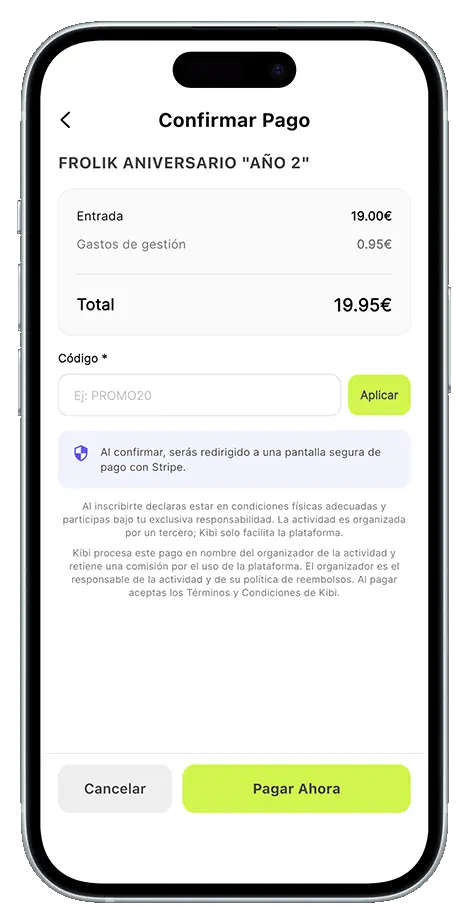
The participant pays the fee
A 5% shown to them itemised before they confirm. Your club pays no monthly plan and no set-up cost.
Apple Pay and Google Pay
Paying takes two taps, with Apple Pay, Google Pay or card, from the app or from the browser.
Invoices and a revenue panel
Your members download their invoice and you see every payment received in the panel.
In-app paymentsFour ways of getting paid, one dashboard
Ticket sales
Price a training session, an event or a race. Several ticket types, pre-sale windows and paid supplements.
Membership fees
A monthly fee that renews on its own, several plans and member categories that unlock with attendance.
Club shop
Publish your club products. Members buy in the app and collect their order with a QR code.
Card reader
Charge straight from your phone: with Tap to Pay technology we turn it into a card reader.
In detailEverything you can do with payments in Kibi
Put a price on what you organise
Every activity can have one or several ticket types, each with its own price. You open the pre-sale when you want, add supplements sold separately, and decide whether sign-ups are approved automatically or reviewed by you.
See how activities work- Several ticket types with different prices
- Pre-sale windows per ticket type
- Supplements sold separately: bus, T-shirt, meal
- Capacity limits per activity
- Automatic or manual approval of sign-ups
- Custom forms filled in at sign-up
The membership fee collects itself
Create one or several monthly plans. Members subscribe from the app and the fee renews automatically, month after month, with no reminders to send. You can also define categories that unlock with check-ins, each with its own perks.
See how memberships work- Several monthly subscription plans
- Automatic renewal, with no one to chase
- Categories unlocked by number of check-ins
- Perks and promo codes per category
- An invoice for every payment
- Members join and manage it from the app
Joins, leaves and plan changes without chasing anyone
Every subscription is managed from the panel: you see who is up to date, who has left and who moved plan. Members handle it from the app too, so you stop processing cancellations over WhatsApp.
See how memberships work- A panel with every subscriber and their status
- Join, leave and change plan from the member app
- Move subscribers between plans yourself
- Change prices without rebuilding the plans
- Payment history for each member
- Revenue from memberships, month by month
Paying takes two taps
The easier it is to pay, the fewer people drop out halfway. In Kibi people pay with Apple Pay, Google Pay or card, without creating any account and without installing the app if they would rather not: the activity link works in the browser.
See how a runner signs up- Apple Pay and Google Pay
- Card, with the details saved for next time
- No account to create and no app to install
- The full price breakdown before confirming
- Discount codes applied on the same screen
- Confirmation by email straight away
Discounts without keeping the count by hand
Hand out percentage codes or free entries with a usage limit. They work for sponsors, ambassadors, or for the people already paying a membership fee.
- Percentage discount codes
- Free-entry codes
- A usage limit per code
- Codes tied to a member category
Your phone is the card reader
With Tap to Pay you charge at the meet-up itself: the customer holds their card or phone against yours and it is done. No reader to buy and no cash for the people who sign up on the day or buy gear on the spot.
See how Tap to Pay works- Tap to Pay on iPhone, from iOS 18
- Also available on Android
- Minimum amount of EUR 0.50
- A summary of takings for each session
The club passport, in your phone Wallet
Every member carries their Club Passport in their phone Wallet, with the QR that identifies them and unlocks the club perks. It keeps itself up to date with the next club race and the activities they have attended — and activity tickets live there too.
See how the Club Passport works- The Club Passport in your phone Wallet
- A QR to identify a member and apply their perks
- The next club race, always up to date
- The number of activities attended
- Activity tickets in the Wallet or as a PDF
Sell your gear inside the app
Clubs can sell T-shirts, merchandise and supplements in Kibi. Members buy from the app, pay with the usual methods and get a QR code in My orders to collect the product next time they see you.
See how the shop works- Merchandise, supplements and any other product
- Payment built into the app
- Your products also appear on your activity pages
- A QR code for the pick-up
The money is yours from minute one
Kibi never sits between you and your income. Every payment goes to the club bank account, and the panel shows the payments received and the revenue for each activity while your members download their invoices.
See the club panel- Payments straight to the club bank account
- A panel with payments received and revenue
- Invoices for your members
- Club statistics, activity by activity
How it worksHow you start charging
Step by step, from start to finish.
Turn on payments for your club
The money you collect goes straight to the club bank account.
Price the activity
Create one or several ticket types and, if you want, supplements sold separately.
Hand out codes if you like
Percentage discounts or free entries, with a usage limit.
Track your revenue
The panel shows the payments received, and your members download their invoices.
What it costsYour club receives the full amount
Of the price you set, for your club
You set the price of the ticket or the membership and that amount reaches the club's account in full. The fee is never taken out of your income.
Added on top and paid by the runner
The fee does not come out of your pocket: it is added on top of the price you set and paid by whoever signs up, itemised for them before they pay. Your club pays no monthly plan, no set-up cost, and nothing at all on free activities.
Questions about getting paid
How much does Kibi charge my club?
Nothing. There is no monthly plan and no set-up cost, and free activities cost nothing either. On paid activities the 5% fee is added to what the participant pays, shown to them before they confirm, so your club receives the full price it set.
Where does the money end up?
In the club's own bank account. You turn on payments once, and the money from tickets, supplements, memberships and shop orders goes directly there.
How can a participant pay?
With Apple Pay, Google Pay or card, from the app or from the browser, with no account to create. In person you can also charge with Tap to Pay, holding their card or phone against yours.
Do my runners need the app to pay?
No. Every activity has a public link that works in the browser, so anyone can sign up and pay without installing anything. The app adds the perks, the chat, the QR check-in, the Club Passport in the Wallet and their activity history.
Can I charge a monthly membership fee?
Yes. You create one or several monthly plans, members subscribe from the app and the fee renews automatically. Joins, leaves and plan changes are handled from the panel, and members can manage their own subscription too.
Can I hand out discounts?
Yes. You can create percentage discount codes or free-entry codes, each with a usage limit, and tie perks and codes to a member category.
Do my members get an invoice?
Yes. Members download the invoice for their payments, and the club panel shows every payment received and the revenue for each activity.
Charge for what your club already does
Create your club, turn on payments and put a price on your next activity. It takes minutes, and your club keeps the full amount.
Apple Pay, Google Pay and card
